Error Handling
Overview
This sample demonstrates how to properly handle errors in M-Files UI Extensions. The application intentionally causes exceptions to show error handling in action.
M-Files UI Extensions can throw two types of errors:
- M-Files exceptions: Custom exceptions that inherit from
MFilesError - JavaScript exceptions: Standard errors like
TypeError,Error, etc.
Adding Error Handling to Existing Code
Starting with the command creation code from the Commands sample, we can add error handling:
Without error handling:
const commandOneId = await shellFrame.Commands.CreateCustomCommand("My First Command");
await shellFrame.Commands.AddCustomCommandToMenu(commandOneId, MFiles.MenuLocation.MenuLocation_TopPaneMenu, 1);
With error handling (catch all M-Files errors):
try {
  const commandOneId = await shellFrame.Commands.CreateCustomCommand("My First Command");
  await shellFrame.Commands.AddCustomCommandToMenu(commandOneId, MFiles.MenuLocation.MenuLocation_TopPaneMenu, 1);
} catch (error) {
  if (error instanceof MFilesError) {
    console.error("M-Files error:", error.message);
    await shellFrame.ShowMessage("Failed to create command: " + error.message);
  } else {
    // Unexpected error - rethrow
    throw error;
  }
}
With specific exception handling:
try {
  await shellFrame.Commands.RemoveCustomCommandFromMenu(
    commandId,
    MFiles.MenuLocation.MenuLocation_TopPaneMenu
  );
} catch (error) {
  if (error instanceof NotFoundError) {
    // Command doesn't exist - maybe already removed
    console.warn("Command not found (already removed?)");

  } else if (error instanceof UnauthorizedAccessError) {
    // Permission denied
    console.error("Access denied:", error.message);
    await shellFrame.ShowMessage("You don't have permission to remove this command.");

  } else if (error instanceof MFilesError) {
    // Other M-Files errors
    console.error("M-Files error:", error.message);
    throw error;

  } else {
    // Unexpected errors
    throw error;
  }
}
Creating the application structure
Creating the application definition file
Create an application definition file named appdef.xml:
- XML
<?xml version="1.0"?>
<application xmlns:xsi="http://www.w3.org/2001/XMLSchema-instance"
             xsi:noNamespaceSchemaLocation="http://www.m-files.com/schemas/appdef-client-v5.xsd">
    <guid>bdb869a1-bd73-4713-91d3-9f6d09dfc3dc</guid>
    <name>Error Handling Sample</name>
    <version>0.1</version>
    <description>Demonstrates error handling by intentionally causing exceptions.</description>
    <publisher>M-Files Corporation</publisher>
    <enabled-by-default>true</enabled-by-default>
    <modules>
        <module environment="shellui">
            <file>main.js</file>
        </module>
    </modules>
</application>
Creating the module
- JavaScript
// NOTE! This code intentionally causes an exception to demonstrate error handling.
//       The error is expected and handled gracefully.

function OnNewShellUI(shellUI) {
  /// <summary>Executed by the UIX when a ShellUI module is started.</summary>
  /// <param name="shellUI" type="MFiles.ShellUI">The shell UI object which was created.</param>

  // Register to be notified when a new shell frame is created.
  shellUI.Events.Register(
    MFiles.Event.NewShellFrame,
    handleNewShellFrame
  );
}

function handleNewShellFrame(shellFrame) {
  /// <summary>Handles the OnNewShellFrame event for an IShellUI.</summary>
  /// <param name="shellFrame" type="MFiles.ShellFrame">The shell frame object which was created.</param>

  // Register to be notified when the shell frame is started.
  shellFrame.Events.Register(
    MFiles.Event.Started,
    getShellFrameStartedHandler(shellFrame)
  );
}

function getShellFrameStartedHandler(shellFrame) {
  /// <summary>Returns a function which handles the OnStarted event for an IShellFrame.</summary>

  return async () => {
    try {
      // Try to add a command that doesn't exist to the menu.
      // This will throw a NotFoundError because the command was never created.
      await shellFrame.Commands.AddCustomCommandToMenu(
        99999,
        MFiles.MenuLocation.MenuLocation_TopPaneMenu,
        1
      );

      // This line will never be reached
      await shellFrame.ShowMessage("Command added successfully");

    } catch (error) {
      if (error instanceof NotFoundError) {
        // Successfully caught the NotFoundError
        console.log("Caught NotFoundError:", error.message);
        await shellFrame.ShowMessage("Error caught successfully: Command does not exist (this is expected for this demo)");

      } else if (error instanceof MFilesError) {
        // Catch any other M-Files errors
        console.error("Other M-Files error:", error.message);
        await shellFrame.ShowMessage("Unexpected M-Files error: " + error.message);

      } else {
        // Unexpected errors - rethrow
        throw error;
      }
    }
  };
}
Deploying the application
To deploy the application:
- Zip the contents of the local development folder.
- Open the M-Files Admin tool and connect to your M-Files server.
- Right-click on the vault to install the application to.
- Select Applications.
- Click Install... and select the zip file.
Testing the application
When you open M-Files with this application installed, you will immediately see a message dialog: "Error caught successfully: Command does not exist (this is expected for this demo)". This demonstrates that the NotFoundError was properly caught and handled.
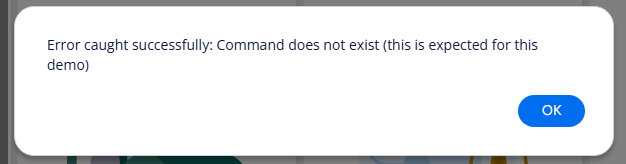
Check the browser console (F12) to see the detailed error logging.
See Also
- Exception Reference - Complete list of all exception types
- Commands Sample - Base sample used in these examples